
To integrate ChainLetter access into your own website you’ll need to understand the primary login flows. ChainLetter uses a jwt (json web token) authentication method and bearer tokens to access API routes.
API Docs can be found here: https://test.chainletter.io/api/v1/docs/
The following diagram shows the process for granting one of your customers access to the ChainLetter platform using the Third-Party API. They can use this account to buy digital items from the ChainLetter store, create a profile, and have a custodial wallet.
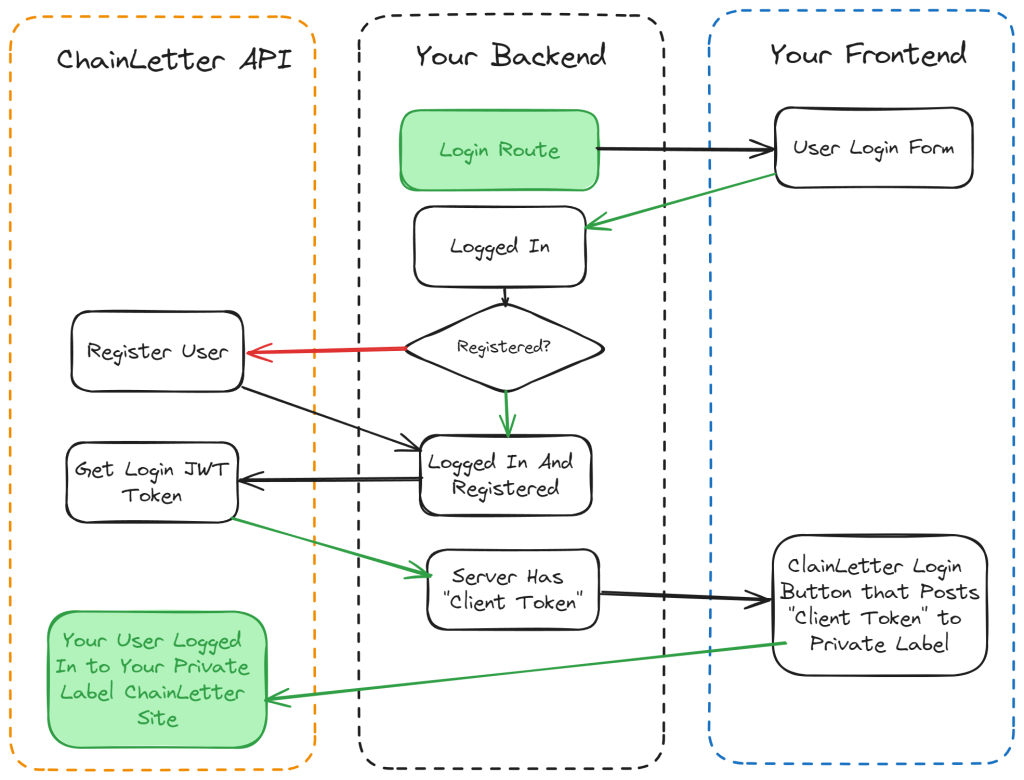
Tip: A customer only needs to be registered once. If you store this registration information in your local identity provider (database, etc.) then you can skip the registration steps above. Registering the same user more than once won’t have any effect but it will waste time and resources.
Example of what a customer would see:

