
This is an addendum to the normal customer log-in flow here: 2. Customer Log-In Flow
This method is a shortcut for calling the corresponding API methods in the Third-Party API. If you want more control over your billing or customer enrollment use the API methods for fine-grained access.
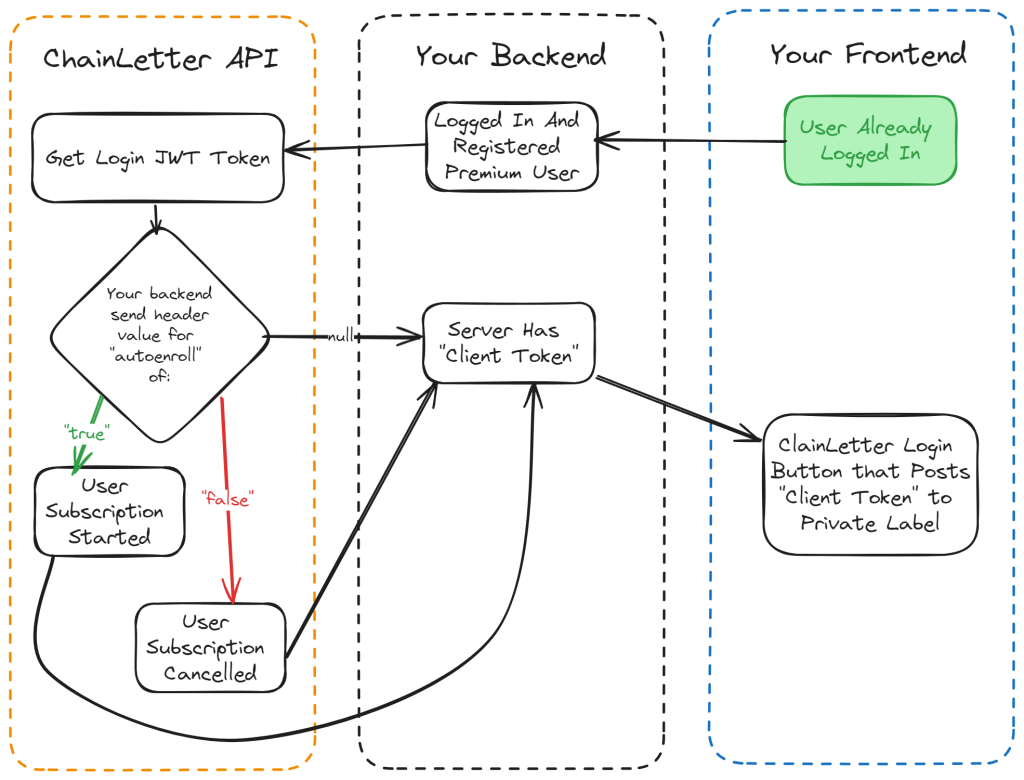
The main difference between this and a typical customer login flow is the addition of the header value for “autoenroll” that your server sends to the get_user_token API method.
Here is an example of what this may look like when calling javascript’s fetch method:
  headers: {
      apikey: process.env.CL_APIKEY,
      "Content-Type": "application/json",
      remote_uuid: user.username, // This must be unique in your application
      autoenroll: user.premiumUser ? "true" : "false",
    }
It’s important to understand what a sponsorship is in the content of ChainLetter. If a user has a sponsorship, when their ChainLetter subscription expires a credit will be debited from the private label treasury and allocated to the user. That credit will be used by the user to renew their premium ChainLetter subscription for 31 days.
Note that using the shortcut outlined in this article will automate the following work flow for “User Subscription Started”
- If a user has a sponsorship, they will be given a normal client login jwt token
- If a user does not have a sponsorship, one will be added to their user account
- If a user does not have any subscription credits in their account, one will be debited from the private label treasury and allocated to them. This is a one way transaction.
- Once the sponsorship and credit are in place, a jwt token will be issued for the user.
- When the user logs in with this token, their subscription will start within ChainLetter
- Every 31 days, a subscription token will be debited from the private label treasury to automatically renew this premium user.
How do I cancel a premium user subscription?
The work flow for “User Subscription Cancelled” in the diagram above is a shortcut to removing a user’s sponsorship. Their subscription will expire once their existing time (purchased with their last credit) is used up.
Tip: You can use this method to cancel a subscription without sending the user the client jwt token. It will still be cancelled, they won’t need to log in to do it.